

Default behavior
If you don’t return anything and no exception is thrown, Forest displays a generic success notification.execute: async (context, resultBuilder) => {
// Perform your logic
// No return = generic success message
}

Success notification
Display a custom success message.return resultBuilder.success('Company is now live!');
result_builder.success(message: 'Company is now live!')

Error notification
Display an error message when something goes wrong.if (!isValid) {
return resultBuilder.error('The company was already live!');
}
if !is_valid
  result_builder.error(message: 'The company was already live!')
end

Always handle errors gracefully and return meaningful error messages to help users understand what went wrong.
HTML result
Return rich formatted content displayed in a side panel. Perfect for showing detailed operation results.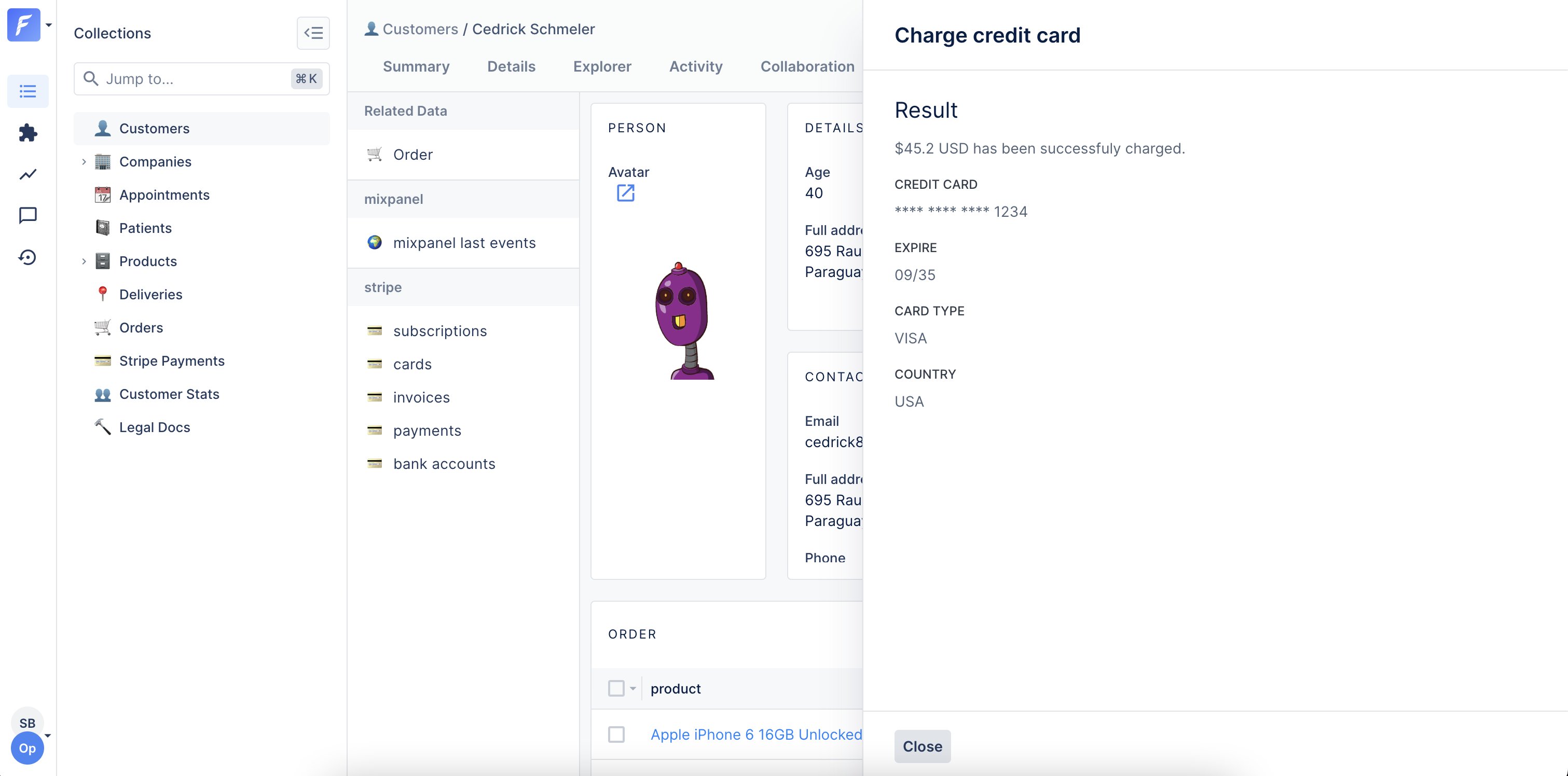
return resultBuilder.success('Charge successful', {
  html: `
    <p class="c-clr-1-4 l-mt l-mb">
      $${amount} USD has been successfully charged.
    </p>
    <strong class="c-form__label--read c-clr-1-2">Credit card</strong>
    <p class="c-clr-1-4 l-mb">**** **** **** ${last4}</p>
    <strong class="c-form__label--read c-clr-1-2">Transaction ID</strong>
    <p class="c-clr-1-4 l-mb">${transactionId}</p>
  `,
});
result_builder.success(
  message: 'Charge successful',
  options: {
    html: "<p class='c-clr-1-4 l-mt l-mb'>$#{amount} USD has been successfully charged.</p>
      <strong class='c-form__label--read c-clr-1-2'>Credit card</strong>
      <p class='c-clr-1-4 l-mb'>**** **** **** #{last4}</p>
      <strong class='c-form__label--read c-clr-1-2'>Transaction ID</strong>
      <p class='c-clr-1-4 l-mb'>#{transaction_id}</p>"
  }
)
HTML with error
You can also return HTML content with an error:return resultBuilder.error('Charge failed', {
html: `
<p class="c-clr-1-4 l-mt l-mb">
$${amount} USD has not been charged.
</p>
<strong class="c-form__label--read c-clr-1-2">Reason</strong>
<p class="c-clr-1-4 l-mb">
The credit card is marked as blocked.
</p>
`,
});
result_builder.error(
  'Charge failed',
  html: "<p class='c-clr-1-4 l-mt l-mb'>$#{amount} USD has not been charged.</p>
    <strong class='c-form__label--read c-clr-1-2'>Reason</strong>
    <p class='c-clr-1-4 l-mb'>The credit card is marked as blocked.</p>"
)
File download
Generate and download files (PDFs, CSVs, Excel, etc.).Actions that generate files must set
generateFile: true in their configuration. This flag prevents using other result types (notifications, HTML) in the same action.collection.addAction('Download report', {
scope: 'Global',
generateFile: true, // Required for file downloads
execute: async (context, resultBuilder) => {
// From a string
return resultBuilder.file(
'Report content here',
'report.txt',
'text/plain'
);
// From a Buffer
const buffer = Buffer.from('Report content');
return resultBuilder.file(buffer, 'report.txt', 'text/plain');
// From a stream
const stream = fs.createReadStream('path/to/file.pdf');
return resultBuilder.file(stream, 'report.pdf', 'application/pdf');
},
});
collection.add_action(
  'Download report',
  BaseAction.new(
    scope: ActionScope::GLOBAL,
    is_generate_file: true
  ) do |_context, result_builder|
    file = File.open('report.pdf', 'r')
    content = file.read
    file.close

    result_builder.file(
      content: content,
      name: 'report.pdf',
      mime_type: 'application/pdf'
    )
  end
)
Common MIME types
| File type | MIME type |
|---|---|
application/pdf | |
| CSV | text/csv |
| Excel (xlsx) | application/vnd.openxmlformats-officedocument.spreadsheetml.sheet |
| Excel (xls) | application/vnd.ms-excel |
| JSON | application/json |
| ZIP | application/zip |
| Plain text | text/plain |
| HTML | text/html |
Example: Generate CSV
collection.addAction('Export to CSV', {
  scope: 'Bulk',
  generateFile: true,
  execute: async (context, resultBuilder) => {
    const records = await context.getRecords(['id', 'name', 'email']);

    // Generate CSV content
    const header = 'ID,Name,Email\n';
    const rows = records.map(r => `${r.id},"${r.name}","${r.email}"`).join('\n');
    const csv = header + rows;

    return resultBuilder.file(csv, 'export.csv', 'text/csv');
  },
});
collection.add_action(
  'Export to CSV',
  BaseAction.new(
    scope: ActionScope::BULK,
    is_generate_file: true
  ) do |context, result_builder|
    records = context.get_records(['id', 'name', 'email'])

    # Generate CSV content
    header = "ID,Name,Email\n"
    rows = records.map { |r| "#{r['id']},\"#{r['name']}\",\"#{r['email']}\"" }.join("\n")
    csv = header + rows

    result_builder.file(content: csv, name: 'export.csv', mime_type: 'text/csv')
  end
)
Example: Generate PDF
collection.addAction('Generate invoice', {
  scope: 'Single',
  generateFile: true,
  execute: async (context, resultBuilder) => {
    const order = await context.getRecord(['id', 'total', 'customer:name']);

    // Generate PDF (using a library like pdfkit)
    const pdf = await generateInvoicePDF(order);

    return resultBuilder.file(
      pdf,
      `invoice-${order.id}.pdf`,
      'application/pdf'
    );
  },
});
collection.add_action(
  'Generate invoice',
  BaseAction.new(
    scope: ActionScope::SINGLE,
    is_generate_file: true
  ) do |context, result_builder|
    order = context.get_record(['id', 'total', 'customer:name'])

    # Generate PDF (using a library like prawn)
    pdf = generate_invoice_pdf(order)

    result_builder.file(
      content: pdf,
      name: "invoice-#{order['id']}.pdf",
      mime_type: 'application/pdf'
    )
  end
)
Redirect
Redirect users to another page after the action executes. Works for both internal Forest pages and external URLs.Internal redirect
Redirect to another page within Forest:return resultBuilder.redirectTo(
'/MyProject/MyEnvironment/MyTeam/data/20/index/record/20/108/activity'
);
result_builder.redirect_to(
  '/MyProject/MyEnvironment/MyTeam/data/20/index/record/20/108/activity'
)
External redirect
Redirect to an external URL:return resultBuilder.redirectTo(
'https://www.example.com/tracking?id=ZW924750388GB'
);
result_builder.redirect_to(
  'https://www.example.com/tracking?id=ZW924750388GB'
)
Example: Redirect to created record
collection.addAction('Create and view', {
  scope: 'Global',
  execute: async (context, resultBuilder) => {
    // Create a new record
    const newRecord = await createRecord(context.formValues);

    // Redirect to the new record's detail page
    return resultBuilder.redirectTo(
      `/MyProject/Production/data/companies/index/record/companies/${newRecord.id}/details`
    );
  },
});
collection.add_action(
  'Create and view',
  BaseAction.new(scope: ActionScope::GLOBAL) do |context, result_builder|
    # Create a new record
    new_record = create_record(context.form_values)

    # Redirect to the new record's detail page
    result_builder.redirect_to(
      "/MyProject/Production/data/companies/index/record/companies/#{new_record['id']}/details"
    )
  end
)
Webhook
Trigger an HTTP callback from the user’s browser. Useful for logging into third-party applications or triggering operations on the user’s behalf.Webhooks are triggered from the user’s browser and are subject to CORS restrictions. Make sure the target server accepts requests from Forest domains.
return resultBuilder.webhook(
  'https://api.example.com/callback',  // URL
  'POST',                                // Method
  { Authorization: 'Bearer token' },     // Headers
  { userId: 123, action: 'approve' }     // Body (JSON)
);
result_builder.webhook(
  url: 'https://api.example.com/callback',
  method: 'POST',
  headers: { 'Authorization' => 'Bearer token' },
  body: { userId: 123, action: 'approve' }
)
Example: Single sign-on
collection.addAction('Login to external tool', {
  scope: 'Single',
  execute: async (context, resultBuilder) => {
    const user = await context.getRecord(['email', 'externalId']);

    // Generate a temporary token
    const token = await generateSSOToken(user.externalId);

    // Trigger login in the user's browser
    return resultBuilder.webhook(
      'https://external-tool.com/sso/login',
      'POST',
      {},
      { token, email: user.email }
    );
  },
});
collection.add_action(
  'Login to external tool',
  BaseAction.new(scope: ActionScope::SINGLE) do |context, result_builder|
    user = context.get_record(['email', 'externalId'])

    # Generate a temporary token
    token = generate_sso_token(user['externalId'])

    # Trigger login in the user's browser
    result_builder.webhook(
      url: 'https://external-tool.com/sso/login',
      method: 'POST',
      headers: {},
      body: { token: token, email: user['email'] }
    )
  end
)
Example: Trigger background job
collection.addAction('Process data', {
  scope: 'Bulk',
  execute: async (context, resultBuilder) => {
    const ids = await context.getRecordIds();

    // Trigger a background job with user context
    return resultBuilder.webhook(
      'https://api.mycompany.com/jobs/process',
      'POST',
      { 'X-API-Key': process.env.API_KEY },
      {
        recordIds: ids,
        userId: context.caller.id,
        triggeredAt: new Date().toISOString()
      }
    );
  },
});
collection.add_action(
  'Process data',
  BaseAction.new(scope: ActionScope::BULK) do |context, result_builder|
    ids = context.get_record_ids

    # Trigger a background job with user context
    result_builder.webhook(
      url: 'https://api.mycompany.com/jobs/process',
      method: 'POST',
      headers: { 'X-API-Key' => ENV['API_KEY'] },
      body: {
        recordIds: ids,
        userId: context.caller.id,
        triggeredAt: Time.now.iso8601
      }
    )
  end
)
Combining results with operations
Success with HTML details
execute: async (context, resultBuilder) => {
  const result = await performComplexOperation();

  if (result.success) {
    return resultBuilder.success('Operation completed', {
      html: `
        <h3>Summary</h3>
        <p>Processed ${result.count} items</p>
        <ul>
          ${result.items.map(i => `<li>${i}</li>`).join('')}
        </ul>
      `,
    });
  } else {
    return resultBuilder.error('Operation failed', {
      html: `<p>Error: ${result.error}</p>`,
    });
  }
}
execute: ->(context, result_builder) {
  result = perform_complex_operation

  if result[:success]
    result_builder.success(
      'Operation completed',
      html: "<h3>Summary</h3>
        <p>Processed #{result[:count]} items</p>
        <ul>#{result[:items].map { |i| "<li>#{i}</li>" }.join}</ul>"
    )
  else
    result_builder.error(
      'Operation failed',
      html: "<p>Error: #{result[:error]}</p>"
    )
  end
}
Conditional redirect
execute: async (context, resultBuilder) => {
  const order = await context.getRecord(['status', 'id']);

  if (order.status === 'pending') {
    // Update and redirect to details
    await updateOrder(order.id, { status: 'approved' });
    return resultBuilder.redirectTo(`/orders/${order.id}`);
  } else {
    // Already processed
    return resultBuilder.error('Order was already processed');
  }
}
execute: ->(context, result_builder) {
  order = context.get_record(['status', 'id'])

  if order['status'] == 'pending'
    # Update and redirect to details
    update_order(order['id'], { status: 'approved' })
    result_builder.redirect_to("/orders/#{order['id']}")
  else
    # Already processed
    result_builder.error('Order was already processed')
  end
}